
SMS API
Send SMS from your own systems
Add SMS to your product or business systems without building your own operator connection. Use Viatel's SMS API for one-time codes, reminders, service alerts, customer notifications, bulk messages and two-way communication.
Operator registered with Sweden's PTS
HTTP POST and GET
Delivery reports
Overview
Track every message your system sends
Use SMS API to send messages automatically from your systems when someone logs in, makes a booking, receives a delivery or makes a payment, or when a service disruption needs attention.
Send through the API, choose a sender and receive status updates. Developers, support staff and operations teams can see what was sent, what arrived and what needs follow-up.
Features
Built for your systems and operations
Send SMS from your systems, track delivery and receive replies when you need them.
HTTP POST and GET
Send messages and retrieve their status with simple requests from any system.
Your own sender name
Set the sender name or number for each message.
Scheduled messages
Queue messages for delivery at a later time.
Delivery reports and replies
Get a status update for each message. Receive replies when you use a mobile number as the sender.
Build SMS into your system
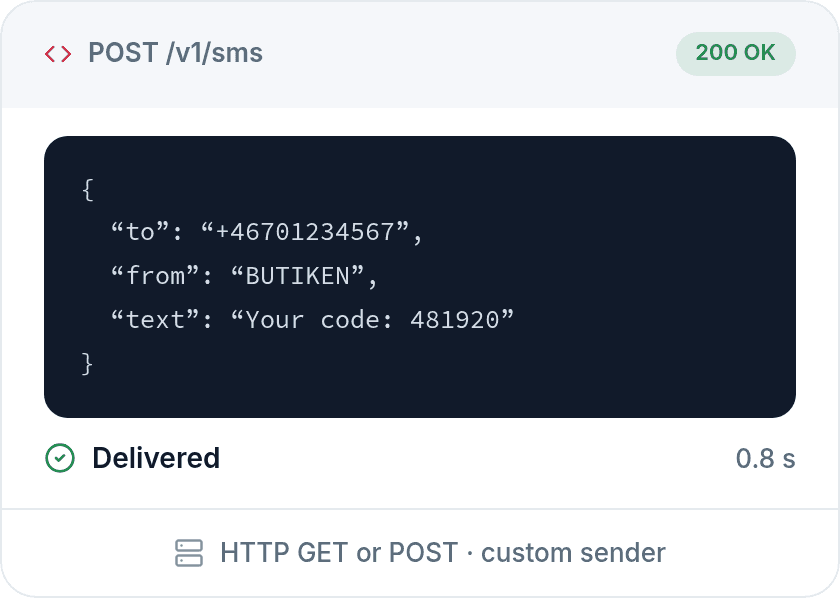
Send an SMS with a simple API request
Use POST, choose your sender and deliver messages directly from your platform.
How it works
How to connect
We review how you'll use SMS and help you set up the API, sender, delivery reports and replies before the integration goes live.
Define your use case
We start with what SMS needs to do in your system: codes, notifications, reminders, replies or bulk messaging.
01
02
03
Compare
Choose how to send your SMS
Choose SMS API when messages need to come from your own systems. Choose SMS Box when marketing, customer service, operations or administration teams want to write, schedule and track messages in a browser.
SMS API
Connect SMS to your own systems.
Send automated notifications.
Send OTPs, reminders and service alerts.
Receive replies and delivery reports.
SMS Box
Get started without an integration.
Write, schedule and send from your browser.
Manage contact lists and campaigns.
Track delivery and replies.
Reliability at every step
Viatel provides communication services built around reliability, data protection and Swedish control, from the data centre to the operator.
Swedish infrastructure
Your data stays in Sweden
We run our services in Swedish data centres, under Swedish jurisdiction.
Security & compliance
Audited and certified
Fully GDPR compliant, our messaging service is ISAE 3402 Type 2 certified. Controls are assessed over time.
Service reliability
99.999% uptime, for high volumes
A platform that handles high volumes and scales with your needs, ready when you need it.
Direct connections
Connected to the operators
Direct operator connections for high quality and reliable delivery.
Frequently asked questions
Questions & answers
Can't find what you're looking for? Get in touch.
What is SMS API?
SMS API is Viatel's API for sending text messages directly from your own systems. Developers and product teams use it to add SMS to your product or business systems, including OTP, reminders, notifications and bulk messaging.
What can we use SMS API for?
Use SMS API for one-time codes, verification, customer notifications, service alerts, reminders, campaigns and two-way messaging. It suits messages that should be triggered automatically by an existing system rather than sent manually from a browser.
How does Viatel's SMS API work?
Viatel's SMS API uses HTTP and supports GET and POST requests. Each request includes details such as the recipient, message and sender. Optional parameters support scheduling and other settings to suit your workflow.
Can we get delivery reports through SMS API?
Yes. Delivery reports let you track the status of sent messages. This is especially useful for service alerts, verification, customer notifications and other messages where you need to know whether an SMS arrived.
Does SMS API support two-way messaging?
Yes. SMS API supports workflows where recipients reply by text. You need a sender that can receive replies, usually a mobile number or another reply-enabled number. Viatel helps you choose the right setup for receiving and processing responses.